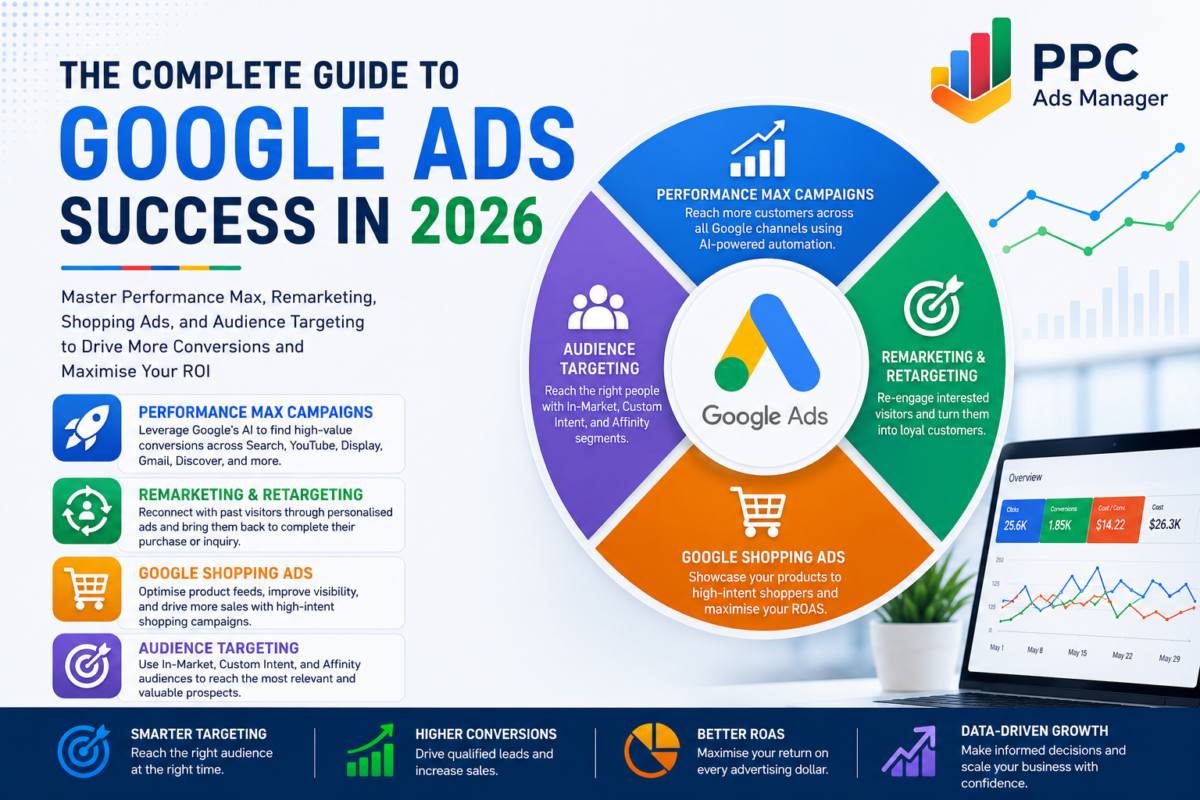
The Complete Guide to Google Ads Success in 2026
Google Ads has evolved into one of the most powerful advertising platforms for businesses seeking measurable growth. However, achieving consistent profitability requires far more than choosing a few keywords and setting a daily budget. Successful campaigns are built on a combination of intelligent automation, strategic audience targeting, personalised remarketing, and well-optimised Shopping campaigns.
Many advertisers focus on a single campaign type while overlooking how Google’s advertising ecosystem works together. Businesses that integrate Performance Max, Remarketing, Google Shopping, and Audience Targeting create a comprehensive strategy that reaches potential customers throughout every stage of the buying journey.
Whether you run an eCommerce store, a SaaS company, a local business, or an enterprise brand, understanding these four areas will help you maximise return on ad spend, generate higher-quality leads, and build campaigns that scale sustainably.
Why a Complete Google Ads Strategy Matters
Consumer behaviour has changed dramatically. Customers rarely make purchasing decisions after a single interaction. They research products, compare competitors, watch videos, read reviews, visit websites multiple times, and often switch between devices before finally converting.
A successful Google Ads strategy recognises this behaviour by creating multiple opportunities for engagement. Instead of relying on one campaign type, businesses should combine several complementary campaigns that work together.
Performance Max expands your reach across Google’s inventory.
Remarketing reconnects with interested prospects.
Shopping Ads showcase products directly within search results.
Audience targeting ensures your budget reaches the people most likely to convert.
Together, these strategies create a powerful advertising system that delivers stronger performance than any single campaign alone.
Google Performance Max Campaigns: How to Set Up and Optimise in 2026
Performance Max has become one of Google’s flagship campaign types, allowing advertisers to access every Google advertising channel through a single campaign.
Instead of manually managing separate campaigns across Search, Display, YouTube, Discover, Gmail, and Maps, advertisers can use Google’s machine learning to distribute budgets where opportunities are strongest.
What Is Performance Max?
Performance Max is an automated campaign type that combines Google’s artificial intelligence with advertiser-provided creative assets and audience signals.
The platform automatically determines:
- Where ads appear
- Which audience should see them
- Which creative performs best
- How bids should be adjusted
- Which placements generate conversions
This automation allows advertisers to reach customers throughout the entire purchasing journey.
When Should You Use Performance Max?
Performance Max works particularly well for:
- eCommerce businesses
- Lead generation companies
- Local businesses
- Retail brands
- Hospitality businesses
- Multi-location organisations
It performs best when sufficient conversion data exists for Google’s algorithms to optimise effectively.
Setting Up a High-Performing Campaign
The success of Performance Max depends heavily on campaign setup.
Begin by selecting the correct conversion goal. Google learns from conversion data, so inaccurate tracking leads to poor optimisation.
Next, organise campaigns by product category or service offering rather than combining everything into one campaign.
Provide high-quality creative assets including:
- Headlines
- Long headlines
- Descriptions
- Images
- Logos
- Videos
The stronger your creative assets, the more combinations Google can test automatically.
Audience Signals
Audience signals are often misunderstood.
They do not restrict targeting. Instead, they provide Google with a strong starting point for finding likely converters.
Useful audience signals include:
- Existing customers
- Website visitors
- In-market audiences
- Custom intent audiences
- Customer Match lists
Providing quality audience signals helps Google’s learning process become more efficient.
Asset Groups
Think of asset groups as individual advertising themes.
For example, an online furniture retailer may create separate asset groups for:
- Sofas
- Dining tables
- Bedroom furniture
- Office furniture
Each group contains highly relevant creative assets and landing pages.
This structure significantly improves campaign relevance.
Optimisation Tips
Optimisation should continue after launch.
Monitor:
- Asset performance
- Search term insights
- Audience signals
- Geographic performance
- Device performance
- Budget allocation
Replace underperforming assets regularly and continue testing new creative combinations.
Performance Max rewards advertisers who consistently refresh creative while maintaining strong conversion tracking.
Google Ads Remarketing and Retargeting
Not every visitor converts during their first interaction.
In reality, many users require multiple touchpoints before making a purchase decision.
Remarketing allows businesses to reconnect with those visitors and guide them back toward conversion.
What Is Remarketing?
Remarketing targets users who have previously interacted with your website, mobile app, YouTube channel, or customer database.
Instead of advertising to completely new audiences, remarketing focuses on people already familiar with your brand.
These users often convert at significantly higher rates than first-time visitors.
Why Remarketing Works
People become distracted.
They compare alternatives.
They postpone purchasing decisions.
Remarketing reminds potential customers that your business exists and encourages them to return when they are ready.
It also reinforces trust through repeated brand exposure.
Types of Remarketing
Google supports several remarketing strategies.
Website Remarketing targets previous website visitors.
Dynamic Remarketing displays products users previously viewed.
Customer Match uses uploaded customer lists.
YouTube Remarketing targets viewers who engaged with your videos.
App Remarketing encourages previous users to return.
Each serves a different stage of the customer journey.
Audience Segmentation
One of the biggest mistakes advertisers make is placing every visitor into the same audience.
Instead, create separate audiences based on behaviour.
Examples include:
- Homepage visitors
- Product viewers
- Category visitors
- Cart abandoners
- Previous purchasers
- Lead form visitors
Each audience deserves unique messaging.
Someone abandoning a shopping cart requires a different advertisement than someone who briefly visited the homepage.
Effective Remarketing Strategy
Successful remarketing balances persistence with relevance.
Show helpful reminders instead of repetitive advertisements.
Highlight:
- Product benefits
- Customer reviews
- Limited-time promotions
- New arrivals
- Free shipping
- Case studies
Personalised messaging consistently outperforms generic advertisements.
Avoiding Remarketing Fatigue
Showing identical advertisements too frequently creates frustration.
Monitor frequency carefully and rotate creative assets regularly.
Excluding recent converters also prevents unnecessary advertising spend.
Google Shopping Ads for E-Commerce
Shopping campaigns have transformed online retail by allowing customers to view products before visiting a website.
Instead of reading only text advertisements, shoppers immediately see:
- Product images
- Pricing
- Reviews
- Merchant names
This creates stronger purchase intent before users even click.
What Are Google Shopping Ads?
Shopping Ads display products directly within Google’s shopping results and search pages.
They rely on product data submitted through Google Merchant Center rather than keywords alone.
Google matches product information with relevant user searches automatically.
Benefits of Shopping Campaigns
Shopping Ads generally produce:
- Higher click-through rates
- Better-qualified traffic
- Improved purchase intent
- Greater product visibility
Because shoppers can already see product details, clicks tend to come from users closer to making a purchase.
Setting Up Google Merchant Center
Merchant Center acts as the foundation of Shopping campaigns.
Businesses upload product information including:
- Product titles
- Descriptions
- Images
- Pricing
- Availability
- Product identifiers
Accurate product information is essential because Google relies on this data when matching products to search queries.
Feed Optimisation
Product feeds directly influence campaign performance.
Optimise titles using keywords customers actually search.
For example:
Instead of:
Running Shoes
Use:
Men’s Lightweight Running Shoes Blue Size 10
Descriptions should clearly explain features while remaining natural and informative.
Images should be high quality, professionally lit, and focused entirely on the product.
Regular feed updates ensure pricing and availability remain accurate.
Maximising Return on Ad Spend
Successful Shopping campaigns require continuous optimisation.
Review product performance regularly.
Increase bids on best-selling products.
Reduce bids for consistently poor performers.
Create separate campaigns for premium products, seasonal inventory, and clearance items.
Segmenting products allows greater budget control.
Performance Max and Shopping
In 2026, Shopping campaigns increasingly complement Performance Max.
Many retailers combine both strategies.
Performance Max expands reach across Google’s inventory while Shopping Ads continue capturing high-intent searches.
Together they create stronger coverage throughout the buying journey.
Google Ads Audience Targeting
Keywords explain what people search for.
Audiences explain who those people are.
Combining both creates significantly more intelligent advertising.
Why Audience Targeting Matters
Two users may search for identical keywords while having completely different purchase intent.
Audience targeting allows advertisers to prioritise users demonstrating stronger buying signals.
Instead of treating every search equally, businesses can invest more heavily in their most valuable prospects.
In-Market Audiences
In-market audiences consist of users actively researching products or services.
Google identifies these users based on browsing behaviour and purchase intent.
Examples include:
- Home improvement
- Business software
- Travel
- Automotive
- Financial services
These audiences often generate stronger conversion rates because users are already considering a purchase.
Custom Intent Audiences
Custom intent audiences provide even greater precision.
Advertisers create audiences using:
- Keywords
- URLs
- Search behaviour
For example, a CRM software provider could build audiences around people researching competing CRM platforms.
This creates exceptionally relevant targeting.
Affinity Audiences
Affinity audiences focus on long-term interests rather than immediate buying intent.
Examples include:
- Business professionals
- Technology enthusiasts
- Fitness lovers
- Food enthusiasts
These audiences work particularly well for awareness campaigns and brand building.
Customer Match
Customer Match enables advertisers to upload customer information securely.
Businesses can reconnect with:
- Existing customers
- Previous buyers
- Newsletter subscribers
- Loyalty members
Customer Match also supports upselling, cross-selling, and customer retention campaigns.
Layering Audiences
One of Google’s most effective strategies combines keywords with audience signals.
Rather than relying exclusively on keyword intent, advertisers can focus budgets on audiences most likely to convert.
For example:
Keyword:
Marketing agency
Audience:
Business decision-makers researching advertising services
This combination significantly improves lead quality.
Observation Versus Targeting
Observation mode collects valuable audience data without limiting campaign reach.
Targeting mode restricts advertisements to selected audiences.
Most advertisers begin with Observation to gather insights before narrowing campaigns using Targeting.
Audience Bid Optimisation
Once performance data accumulates, advertisers can increase bids for high-performing audiences.
Examples include:
- Returning visitors
- Existing customers
- High-value purchasers
- In-market audiences
Likewise, bids can be reduced for audiences producing lower conversion rates.
This improves efficiency without sacrificing reach.
Bringing Everything Together
Although each strategy provides value independently, their true strength appears when integrated into a unified advertising framework.
Performance Max identifies opportunities across Google’s ecosystem using automation and machine learning.
Shopping Ads capture high-intent customers actively comparing products.
Audience targeting ensures advertising budgets focus on users most likely to convert.
Remarketing reconnects with visitors who demonstrated interest but were not yet ready to purchase.
Together these strategies support every stage of the customer journey.
A new prospect may first discover your business through Performance Max.
They later search for products using Shopping Ads.
If they leave without purchasing, remarketing reminds them to return.
Throughout the process, audience targeting ensures advertising spend remains focused on qualified prospects.
This integrated approach improves efficiency, increases conversion rates, and delivers stronger long-term profitability.
Common Mistakes to Avoid
Even experienced advertisers can limit campaign performance through avoidable mistakes.
These include:
- Launching Performance Max without accurate conversion tracking.
- Using low-quality creative assets.
- Failing to optimise product feeds.
- Treating every website visitor as the same remarketing audience.
- Ignoring audience insights.
- Setting campaigns and rarely reviewing performance.
- Relying entirely on automation without strategic oversight.
Google’s automation is powerful, but it performs best when supported by high-quality data, thoughtful campaign structure, and ongoing optimisation.
Final Thoughts
Google Ads continues to evolve, offering advertisers increasingly sophisticated tools for reaching customers across multiple channels. Businesses that embrace these capabilities strategically are better positioned to outperform competitors while making smarter use of their advertising budgets.
Performance Max simplifies campaign management through intelligent automation. Remarketing strengthens customer relationships by reconnecting with interested prospects. Shopping Ads place products directly in front of ready-to-buy customers, while advanced audience targeting ensures every advertising dollar is invested more effectively.
Rather than viewing these campaign types as separate tactics, businesses should see them as interconnected components of a complete performance marketing strategy. Together, they create a customer journey that attracts new audiences, nurtures consideration, drives conversions, and encourages long-term customer value.
Whether your objective is generating qualified leads, increasing online sales, expanding into new markets, or improving return on ad spend, combining these four Google Ads strategies provides a scalable foundation for sustainable growth.
Ready to Improve Your Google Ads Performance?
If your campaigns are not delivering the results you expect, the issue may not be your budget. It may be your strategy.
At PPC Ads Manager, we help businesses build data-driven Google Ads campaigns that combine Performance Max, Shopping Ads, audience targeting, and remarketing into a cohesive growth system. From campaign setup and conversion tracking to continuous optimisation and performance analysis, our focus is simple: helping you generate better leads, maximise return on ad spend, and achieve measurable business growth.
If you are ready to transform your advertising into a predictable growth engine, get in touch with our team and discover how a smarter Google Ads Audit strategy can help your business scale with confidence.
Frequently Asked Questions
1. What is Google Performance Max, and is it suitable for every business?
Google Performance Max is an AI-powered campaign type that allows advertisers to run ads across Google’s entire network, including Search, Display, YouTube, Gmail, Discover, Maps, and Shopping. It works well for eCommerce stores, lead generation businesses, local service providers, and brands with reliable conversion tracking.
2. How long does a Performance Max campaign take to deliver results?
Most Performance Max campaigns require a learning period of two to six weeks. During this time, Google’s algorithms collect data and optimise bidding, audience selection, and placements to improve campaign performance.
3. What is the difference between remarketing and retargeting?
The terms are often used interchangeably. Remarketing generally refers to reconnecting with previous website visitors or customers using personalised ads, while retargeting focuses on serving ads to users who have previously interacted with your business online.
4. Why are Google Shopping Ads important for eCommerce businesses?
Google Shopping Ads display product images, prices, ratings, and store information directly in search results. This attracts highly qualified shoppers who are already looking for products, resulting in higher purchase intent and better conversion rates.
5. How can I improve the performance of my Google Shopping campaigns?
Optimise your product feed by using descriptive product titles, accurate descriptions, high-quality images, competitive pricing, and updated availability. Regularly review product performance and adjust bids based on return on ad spend.
6. What are audience signals in Google Performance Max?
Audience signals help Google’s machine learning understand who is most likely to convert. They act as a starting point for optimisation and can include Customer Match lists, website visitors, in-market audiences, and custom audiences.
7. What is the difference between in-market, custom intent, and affinity audiences?
In-market audiences consist of users actively researching products or services. Custom intent audiences are built around specific keywords, URLs, or search behaviour relevant to your business. Affinity audiences represent users with long-term interests and lifestyle preferences, making them ideal for awareness campaigns.
8. Should I use audience targeting along with keyword targeting?
Yes. Combining audience targeting with keyword targeting helps you reach users who are not only searching for relevant terms but are also more likely to convert based on their interests, behaviour, and purchase intent.
9. Can Performance Max, Shopping Ads, and Remarketing campaigns run together?
Absolutely. These campaign types complement one another. Performance Max expands your reach, Shopping Ads capture high-intent buyers, and Remarketing brings back visitors who did not convert during their first interaction. Together, they create a comprehensive Google Ads strategy.
10. How often should Google Ads campaigns be optimised?
Campaigns should be monitored weekly, with detailed optimisation performed at least once a month. Regular analysis of search terms, audience performance, creative assets, product feeds, conversion data, and bidding strategies ensures campaigns continue delivering strong results as market conditions evolve.