Performance marketing is not about spending more money. It is about making every click, impression, and conversion work harder.
Many businesses launch Google Ads campaigns expecting immediate results, only to discover that budgets disappear quickly while leads remain inconsistent. In most cases, the problem is not the platform. The issue lies in campaign structure, audience selection, account optimisation, and ongoing management.
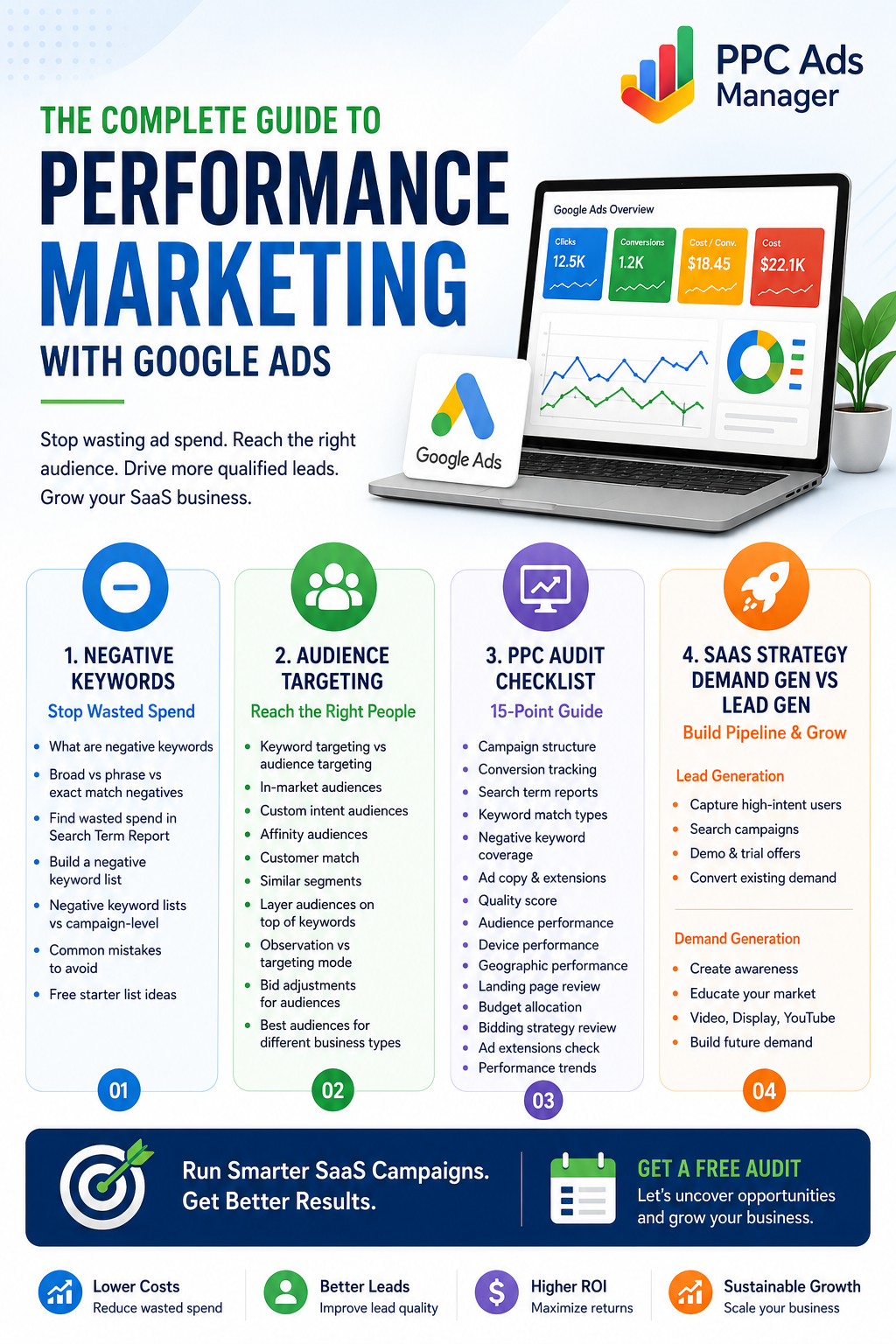
Four areas consistently separate profitable advertisers from those struggling to achieve returns:
- Negative keyword management
- Audience targeting
- Regular PPC audits
- SaaS-specific campaign strategies
Mastering these areas can dramatically improve conversion rates, reduce wasted spend, and create scalable growth.
This guide explores each topic in detail and shows how they work together to create a high-performing Google Ads strategy.
Why These Four Areas Matter Together
Many advertisers focus only on keyword research and bidding. While those elements are important, success depends on a broader system.
A campaign that targets the right keywords but ignores negative keywords wastes money.
A campaign with excellent keywords but poor audience targeting reaches the wrong users.
A campaign with strong targeting but no regular audits slowly becomes inefficient.
A SaaS business running standard lead generation campaigns often misses opportunities to build demand and educate prospects.
When combined correctly, these four pillars create a powerful framework for profitable advertising.
Google Ads Negative Keywords: The Secret to Stopping Wasted Spend
Most advertisers spend time finding keywords to target.
Few spend enough time identifying keywords they should avoid.
Negative keywords prevent ads from showing for irrelevant searches. They help protect budgets and improve campaign efficiency.
What Are Negative Keywords?
Negative keywords tell Google not to display your ads when specific words or phrases appear in a user’s search query.
For example, if you sell premium marketing software, you may want to exclude:
- Free
- Cheap
- Jobs
- Careers
- Internship
- Tutorial
Without these exclusions, you may pay for clicks from users who have no intention of purchasing your product.
Why Negative Keywords Matter
Benefits include:
- Reduced wasted spend
- Improved click-through rates
- Better conversion rates
- Higher lead quality
- More accurate campaign data
- Better return on ad spend
Even small improvements in relevance can significantly impact profitability over time.
Broad, Phrase, and Exact Match Negative Keywords
Understanding match types is critical.
Broad Match Negatives
Broad negatives block searches containing all the negative terms, regardless of order.
Example:
Negative keyword: free software
Blocked searches may include:
- software free trial
- free business software
However, Google may still allow some variations.
Phrase Match Negatives
Phrase match negatives block searches containing the exact phrase in the same order.
Example:
Negative phrase: “free software”
Blocked searches:
- free software download
- best free software
Exact Match Negatives
Exact match negatives block only the precise search query.
Example:
Negative exact: [free software]
Blocked:
- free software
May still allow:
- free software online
- best free software
Using Search Term Reports to Find Waste
The Search Term Report is one of the most valuable optimisation tools in Google Ads.
Review it regularly to identify:
- Irrelevant searches
- Low-intent queries
- Competitor terms you do not want
- Research-focused searches
- Job seekers
Patterns quickly emerge that reveal where budgets are leaking.
Building a Strong Negative Keyword List
A proactive approach is better than a reactive one.
Common categories include:
Employment Searches
- Jobs
- Careers
- Hiring
- Resume
- Salary
Educational Searches
- Course
- Tutorial
- Training
- Certification
Freebie Seekers
- Free
- Discount
- Cheap
- Sample
Research Queries
- Definition
- Meaning
- Examples
Each business will have unique exclusions based on its goals and audience.
Campaign-Level vs Negative Keyword Lists
Campaign-Level Negatives
Applied to a single campaign.
Best when exclusions are campaign specific.
Shared Negative Keyword Lists
Applied across multiple campaigns.
Best for:
- Jobs
- Careers
- Free
- Support requests
- Existing customer searches
Shared lists simplify management and ensure consistency.
Common Negative Keyword Mistakes
Avoid these errors:
- Adding negatives without analysing data
- Blocking valuable search traffic
- Never reviewing search terms
- Using only exact match negatives
- Failing to update lists regularly
Negative keyword management should be an ongoing process rather than a one-time task.
Google Ads Audience Targeting: Reaching the Right People
Keywords tell Google what users are searching for.
Audiences tell Google who those users are.
Combining both creates stronger targeting and better campaign performance.
Keyword Targeting vs Audience Targeting
Keywords focus on intent.
Audience targeting focuses on user characteristics, interests, and behaviours.
Together they provide context that improves campaign efficiency.
For example:
Keyword: CRM software
Audience: Business owners actively researching sales software
The combination is significantly more valuable than either signal alone.
Types of Google Ads Audiences
Google provides several audience options that advertisers can use to refine targeting.
In-Market Audiences
In-market audiences consist of users actively researching products or services.
These users demonstrate purchase intent through their browsing behaviour.
Examples include:
- Business software buyers
- Marketing service seekers
- Financial service shoppers
- Technology purchasers
These audiences often generate strong conversion rates because they are already in buying mode.
Custom Intent Audiences
Custom intent audiences allow advertisers to create highly targeted groups based on:
- Keywords
- URLs
- Search behaviour
For example, a SaaS company selling project management software could build an audience around searches for:
- Project management tools
- Team collaboration software
- Workflow management solutions
This creates a highly relevant audience segment.
Affinity Audiences
Affinity audiences represent long-term interests and habits.
Examples include:
- Business professionals
- Technology enthusiasts
- Entrepreneurs
- Marketing professionals
Affinity audiences work particularly well for awareness campaigns.
Customer Match
Customer Match allows advertisers to upload customer data and target existing contacts.
Use cases include:
- Upselling
- Cross-selling
- Retention campaigns
- Renewal campaigns
This is often one of the highest-performing audience strategies available.
Similar Segments
Google can identify users who resemble your existing customers.
These audiences help advertisers expand reach while maintaining relevance.
They are especially useful for scaling successful campaigns.
Layering Audiences on Top of Keywords
One of the most effective strategies is combining keyword targeting with audience signals.
For example:
Keyword:
- PPC management agency
Audience:
- Marketing decision-makers
- Business owners
- In-market advertising buyers
This creates a more focused and qualified traffic source.
Observation Mode vs Targeting Mode
Many advertisers misunderstand these settings.
Observation Mode
Observation allows Google to collect audience data without restricting traffic.
Benefits include:
- Audience insights
- Performance comparisons
- Bid adjustment opportunities
This is often the safest starting point.
Targeting Mode
Targeting limits ads exclusively to selected audiences.
Benefits include:
- Higher precision
- Better control
- Improved relevance
However, reach may decrease significantly.
Audience Bid Adjustments
Once sufficient data exists, advertisers can increase bids for high-performing audiences.
Examples:
- Increase bids for returning visitors
- Increase bids for in-market users
- Reduce bids for low-converting segments
This helps direct budget toward the most profitable users.
Best Audiences for Different Business Types
SaaS Companies
- Custom intent audiences
- Customer Match
- Remarketing audiences
- In-market software buyers
E-Commerce Brands
- Shopping audiences
- Product viewers
- Cart abandoners
- Similar segments
Lead Generation Businesses
- In-market audiences
- Customer Match
- Industry-specific custom audiences
Audience targeting becomes more powerful as campaign data grows.
Google Ads for SaaS Companies: Demand Generation vs Lead Generation
SaaS marketing differs from most industries.
Purchases often involve:
- Longer sales cycles
- Multiple decision-makers
- Product research
- Trial periods
- Demonstrations
As a result, SaaS advertisers must balance demand generation and lead generation.
What Is Lead Generation?
Lead generation targets users actively searching for solutions.
Examples:
- CRM software demo
- Project management software
- Best accounting software
These users are already aware of their problem.
The objective is conversion.
What Is Demand Generation?
Demand generation targets users before they actively search for solutions.
The objective is education and awareness.
Examples include:
- Industry insights
- Problem-focused content
- Case studies
- Thought leadership campaigns
Demand generation creates future demand rather than capturing existing demand.
Why SaaS Companies Need Both
Many SaaS brands rely exclusively on lead generation.
This creates dependence on existing search demand.
Demand generation expands the pool of future buyers.
A balanced strategy creates:
- Short-term pipeline growth
- Long-term market expansion
- Better brand recognition
- Lower acquisition costs over time
Effective SaaS Lead Generation Campaigns
High-performing SaaS lead generation campaigns often include:
- Search campaigns
- Competitor targeting
- High-intent landing pages
- Demo offers
- Free trials
The goal is converting existing demand efficiently.
Effective SaaS Demand Generation Campaigns
Demand generation works best with:
- Video campaigns
- Display campaigns
- YouTube advertising
- Educational content
- Case studies
- Webinars
The focus is creating awareness and nurturing prospects.
Measuring SaaS Success
Important metrics include:
- Cost per lead
- Customer acquisition cost
- Trial-to-paid conversion rate
- Pipeline value
- Return on ad spend
- Lifetime value
Revenue-focused metrics are more meaningful than vanity metrics such as clicks and impressions.
PPC Audit Checklist: A 15-Point Framework for Reviewing Any Google Ads Account
Even strong campaigns decline over time.
Regular audits ensure performance remains strong.
Use this 15-point checklist when reviewing any Google Ads account.
1. Review Campaign Structure
Ensure campaigns are logically organised by:
- Service
- Product
- Location
- Audience
2. Evaluate Conversion Tracking
Accurate tracking is essential.
Verify:
- Form submissions
- Calls
- Purchases
- Trial signups
3. Analyse Search Term Reports
Identify irrelevant traffic and new negative keyword opportunities.
4. Review Keyword Match Types
Check whether broad match usage aligns with campaign goals.
5. Assess Negative Keyword Coverage
Look for missing exclusions causing wasted spend.
6. Evaluate Ad Copy
Review:
- Headlines
- Descriptions
- Calls to action
- Relevance
7. Examine Quality Score
Focus on:
- Expected CTR
- Ad relevance
- Landing page experience
8. Review Audience Performance
Identify top-performing audience segments.
9. Check Device Performance
Compare:
- Mobile
- Desktop
- Tablet
Adjust bids accordingly.
10. Analyse Geographic Performance
Review results by:
- Country
- State
- City
- Region
11. Evaluate Landing Pages
Ensure pages provide:
- Fast load speeds
- Clear messaging
- Strong calls to action
12. Review Budget Allocation
Shift budget toward top-performing campaigns.
13. Check Automated Bidding Strategies
Verify bidding aligns with business goals.
14. Examine Ad Extensions
Ensure use of:
- Sitelinks
- Callouts
- Structured snippets
- Call extensions
15. Compare Performance Trends
Review:
- Month-over-month performance
- Quarter-over-quarter performance
- Seasonal trends
Consistent audits reveal opportunities that daily management often misses.
How These Four Strategies Work Together
The most profitable Google Ads accounts rarely rely on a single tactic.
Instead, they combine:
- Strong negative keyword management
- Precise audience targeting
- Regular account audits
- Industry-specific campaign strategies
For SaaS businesses, this combination becomes even more powerful.
Negative keywords reduce waste.
Audience targeting improves relevance.
Audits uncover hidden opportunities.
Demand generation and lead generation create sustainable growth.
When implemented together, these strategies transform Google Ads from a cost centre into a predictable revenue engine.
Whether you manage campaigns internally or work with an agency, focusing on these four areas will help improve efficiency, increase lead quality, and generate stronger long-term returns.
If your SaaS campaigns are struggling to scale, or if you are unsure where budget is being wasted, a comprehensive account review with Google Ads Audit can uncover immediate opportunities for growth and profitability.
Frequently Asked Questions
1. What are negative keywords in Google Ads?
Negative keywords prevent your ads from appearing for irrelevant searches, helping reduce wasted spend and improve lead quality.
2. How often should I review my Search Term Report?
Most advertisers should review it weekly, while high-spend accounts may benefit from daily monitoring.
3. What is the difference between audience targeting and keyword targeting?
Keywords focus on what users search for, while audiences focus on who those users are based on interests, behaviour, and intent.
4. What are in-market audiences?
In-market audiences consist of users actively researching products or services and showing strong purchase intent.
5. Should I use Observation or Targeting mode?
Observation mode is usually best when gathering audience insights. Targeting mode is useful when you want to restrict ads to specific audience groups.
6. What is Customer Match?
Customer Match allows advertisers to target existing customers using uploaded customer data such as email addresses.
7. Why do SaaS companies need demand generation campaigns?
Demand generation helps educate potential buyers and build future demand before prospects actively begin searching for solutions.
8. What is the difference between demand generation and lead generation?
Demand generation creates awareness and interest, while lead generation captures users already searching for a solution.
9. How often should a Google Ads account be audited?
A light audit should be performed monthly, while a comprehensive audit should be conducted quarterly.
10. What is the most common cause of wasted Google Ads spend?
Poor negative keyword management is one of the most common reasons advertisers lose budget on irrelevant traffic.
11. Which audiences work best for SaaS companies?
Custom intent audiences, Customer Match, remarketing audiences, and in-market software buyers typically perform best.
12. What metrics matter most for SaaS Google Ads campaigns?
Customer acquisition cost, lifetime value, pipeline revenue, trial-to-paid conversion rate, and return on ad spend are among the most important metrics.