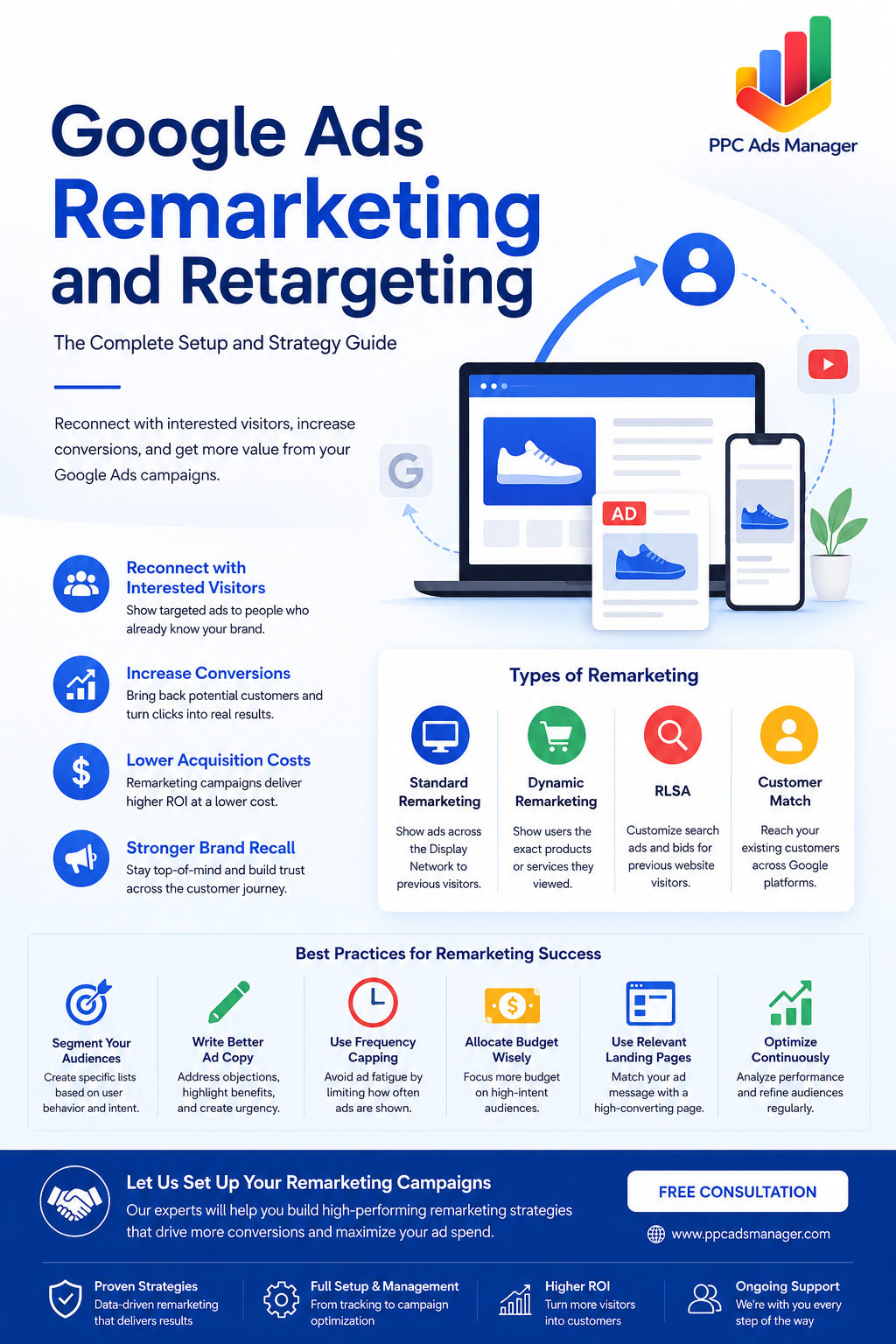
Reconnect with Interested Visitors and Turn More Clicks into Customers
Most website visitors do not convert during their first visit. They may browse your services, compare prices, read a few pages, and then leave without taking action. That does not mean they are not interested. In many cases, they simply need more time before making a decision.
This is where Google Ads remarketing becomes one of the most powerful tools in digital advertising. Instead of constantly spending money to reach new audiences, remarketing allows you to reconnect with people who have already interacted with your website, products, or business.
In this guide, you’ll learn how Google Ads remarketing works, how to set it up correctly, the different types of remarketing campaigns available, and the best strategies to maximize your return on investment.
What Is Remarketing?
Remarketing is a digital advertising strategy that targets users who have previously interacted with your website, mobile app, YouTube channel, or other digital assets.
When someone visits your website, a tracking tag records their interaction. You can then show tailored ads to those users as they browse other websites, watch YouTube videos, or perform additional searches on Google.
The goal is simple: bring potential customers back and encourage them to complete the action they did not take during their first visit.
Remarketing vs Retargeting
The terms remarketing and retargeting are often used interchangeably, but there are slight differences.
Retargeting generally refers to showing paid advertisements to users who have previously visited your website.
Remarketing is a broader term that may include paid advertising, email campaigns, customer re-engagement strategies, and audience-based marketing efforts.
In Google Ads, both concepts largely work together through audience targeting and personalized advertising.
Why Remarketing Matters
Remarketing consistently delivers some of the highest returns in PPC advertising because it targets people who already know your brand.
Benefits include:
- Higher conversion rates
- Lower cost per acquisition
- Improved brand recall
- Increased customer lifetime value
- Better use of advertising budgets
- Stronger engagement with warm audiences
Rather than starting from zero, you’re marketing to users who have already shown interest in your business.
How Google Ads Remarketing Works
Google Ads uses tracking technologies to identify website visitors and place them into audience lists.
The process works like this:
- A visitor lands on your website.
- A Google Ads tag or GA4 tracking code records the visit.
- The visitor is added to a predefined audience list.
- Google Ads serves relevant ads to that user across the Google Display Network, YouTube, Gmail, Discover, or Search.
- The user returns and completes a desired action such as filling out a form, making a purchase, or contacting your business.
This allows advertisers to continue the conversation even after a visitor leaves the website.
Setting Up Google Ads Remarketing
A successful remarketing campaign starts with proper audience tracking.
Step 1: Install Google Tag Manager
Google Tag Manager simplifies tracking implementation and helps manage marketing tags without modifying website code repeatedly.
If you already use Google Tag Manager, you can deploy Google Ads and Google Analytics tracking tags from one central location.
Step 2: Configure Google Analytics 4
GA4 is now the preferred audience-building platform for Google Ads.
After installing GA4:
- Enable Enhanced Measurement
- Configure key events
- Set up conversions
- Verify data collection
- Link GA4 with Google Ads
This connection allows audience sharing between both platforms.
Step 3: Link Google Ads and GA4
Inside GA4:
- Navigate to Admin
- Open Product Links
- Select Google Ads Links
- Connect your Google Ads account
Once linked, audience data can flow directly into Google Ads.
Step 4: Create Audience Lists
Navigate to:
GA4 → Admin → Audiences
Create audience segments based on user behavior.
Examples include:
- All website visitors
- Visitors of a specific service page
- Product viewers
- Cart abandoners
- Lead form visitors
- Previous customers
- High-engagement users
The more strategic your audience segmentation, the better your campaign performance.
Types of Google Ads Remarketing
Google Ads offers several remarketing options depending on your goals.
1. Standard Remarketing
Standard remarketing displays ads to previous visitors as they browse websites within Google’s Display Network.
This is the most common and beginner-friendly form of remarketing.
Best for:
- Brand awareness
- Lead generation
- Service businesses
- General customer re-engagement
2. Dynamic Remarketing
Dynamic remarketing shows users the exact products or services they viewed on your website.
For example, if a visitor viewed a particular pair of shoes but did not purchase them, they may later see an ad featuring those same shoes.
Best for:
- Ecommerce stores
- Online retailers
- Travel websites
- Real estate listings
Dynamic ads often produce significantly higher conversion rates because of their personalized nature.
3. Remarketing Lists for Search Ads (RLSA)
RLSA allows advertisers to customize search campaigns specifically for previous website visitors.
For example:
A user visits your website but leaves without converting.
A week later, they search for a related service on Google.
Your business can increase bids, show tailored messaging, or prioritize ad placement for that specific user.
Best for:
- Competitive industries
- High-value services
- B2B companies
- Lead generation campaigns
4. Customer Match
Customer Match allows businesses to upload customer information such as email addresses and target those users across Google platforms.
This is particularly useful for:
- Upselling existing customers
- Cross-selling products
- Loyalty campaigns
- Re-engagement campaigns
Customer Match helps advertisers create highly personalized marketing experiences.
Creating Effective Audience Lists
The quality of your audience list often determines campaign success.
Instead of creating one large audience, segment users based on intent and behavior.
High-Intent Audiences
These users are closest to conversion.
Examples:
- Cart abandoners
- Pricing page visitors
- Contact page visitors
- Demo request visitors
These audiences typically deserve higher bids and larger budgets.
Medium-Intent Audiences
Examples:
- Product category visitors
- Service page visitors
- Blog readers
- Multiple-session users
These audiences often need more nurturing before converting.
Low-Intent Audiences
Examples:
- Homepage visitors
- Single-page visitors
- Short-duration visits
Use broader messaging and lower bids for these segments.
Best Practices for Remarketing Ad Copy
Remarketing audiences already know your brand.
Instead of introducing yourself again, focus on motivating action.
Address Common Objections
Help users overcome hesitation.
Examples:
- Still comparing options?
- Ready to get started?
- Looking for a better solution?
Highlight Benefits
Focus on outcomes rather than features.
Examples:
- Increase leads faster
- Save time and resources
- Improve campaign performance
Create Urgency
Encourage action without being overly aggressive.
Examples:
- Limited-time offer
- Free consultation available
- Book your strategy call today
Use Social Proof
Build trust through credibility.
Examples:
- Trusted by hundreds of businesses
- Proven results across industries
- Client success stories available
Match Landing Pages
Your ad message should align closely with the landing page experience.
Consistent messaging increases trust and improves conversion rates.
For more conversion-focused strategies, read our Best Landing Page Strategy for Google Ads guide.
Understanding Frequency Capping
One of the biggest mistakes advertisers make is showing remarketing ads too frequently.
Seeing the same ad repeatedly can annoy users and damage brand perception.
Frequency capping limits how often an individual sees your advertisement.
Recommended starting points:
- Display campaigns: 3 to 5 impressions per day
- YouTube campaigns: 2 to 4 impressions per day
- High-ticket services: Slightly higher frequency may be acceptable
Monitor engagement and adjust accordingly.
The goal is to remain visible without becoming intrusive.
Budget Allocation Tips for Remarketing Campaigns
Remarketing campaigns generally require smaller budgets than prospecting campaigns because the audience size is more limited.
A common allocation strategy is:
- 70% to 80% for new audience acquisition
- 20% to 30% for remarketing
However, businesses with strong website traffic often increase remarketing investment due to its superior conversion performance.
Prioritize High-Intent Audiences
Allocate more budget to:
- Cart abandoners
- Lead form visitors
- Product viewers
- Returning visitors
These users are most likely to convert.
Adjust Bids by Audience Value
Not all visitors are equal.
Increase bids for:
- Recent visitors
- High-engagement users
- Returning visitors
- Previous leads
Reduce bids for broader, lower-intent audiences.
Common Remarketing Mistakes to Avoid
Even experienced advertisers make remarketing errors.
Avoid these common issues:
- Using only one audience list
- Ignoring audience exclusions
- Running generic ad copy
- Showing ads too frequently
- Sending traffic to irrelevant landing pages
- Failing to update audience segments
- Neglecting conversion tracking
Regular optimization is essential for long-term success.
Final Thoughts
Google Ads remarketing is one of the most effective ways to recover lost opportunities and improve advertising profitability. By targeting users who have already engaged with your business, you can increase conversions, reduce acquisition costs, and strengthen brand recognition.
Whether you choose standard remarketing, dynamic remarketing, RLSA, or Customer Match campaigns, success depends on proper audience segmentation, compelling ad creative, thoughtful frequency management, and continuous optimization.
When implemented correctly, remarketing transforms website visitors into leads and leads into loyal customers.
If you’re already investing in paid advertising, remarketing should be a core part of your overall strategy.
For a broader understanding of PPC success, explore The Complete Guide to High-Performance Paid Advertising and our upcoming Google Ads Audience Targeting guide.
Frequently Asked Questions
How long should a remarketing audience last?
Most businesses use audience durations between 30 and 90 days. Higher-value products and longer sales cycles may benefit from audience durations of up to 180 days.
Is Google Ads remarketing effective?
Yes. Remarketing often delivers higher conversion rates and lower acquisition costs because it targets users who already know your business.
Do I need Google Analytics 4 for remarketing?
While other methods exist, GA4 is the recommended approach because it provides advanced audience creation and seamless integration with Google Ads.
What is the difference between dynamic and standard remarketing?
Standard remarketing shows general ads to previous visitors. Dynamic remarketing displays the exact products or services users previously viewed.
How much budget should I allocate to remarketing?
Many advertisers dedicate 20% to 30% of their Google Ads budget to remarketing campaigns, though the ideal percentage depends on traffic volume and business goals.
Can remarketing work for service-based businesses?
Absolutely. Service providers can create audiences based on page visits, consultation requests, pricing page interactions, and other engagement signals.
What is RLSA in Google Ads?
Remarketing Lists for Search Ads allows advertisers to modify search bids and messaging specifically for users who have previously visited their website.
Let Our Team Build High-Converting Remarketing Campaigns
If you’re spending money on Google Ads but not using remarketing, you’re leaving potential conversions on the table. Our PPC specialists can create audience segments, implement tracking, build remarketing campaigns, and optimize performance to help you recover lost leads and increase revenue.
Book a free consultation today at Free Google Ads and discover how strategic remarketing can improve your advertising results.